

About a month ago, I bought the Premium Hosting plan from Hostinger—mainly because it was available at a great price. As a bonus, I got a free .com domain with it. But then came the big question: What should I actually do with this domain?
While exploring the Hostinger dashboard, I stumbled upon their website builder tool. Out of curiosity, I picked a sample template and published my very first website. It was live! But something felt off… Sure, I had a website, but it was basically a placeholder—no real content, and no reason for anyone to visit it.
So I kept exploring.
In the Websites section of the Hostinger hPanel, I noticed an option to add a website. I clicked on it, and that’s when I discovered Hostinger Horizons—their no-code web app builder. I clicked on it without much expectation, but it turned out to be surprisingly interesting.
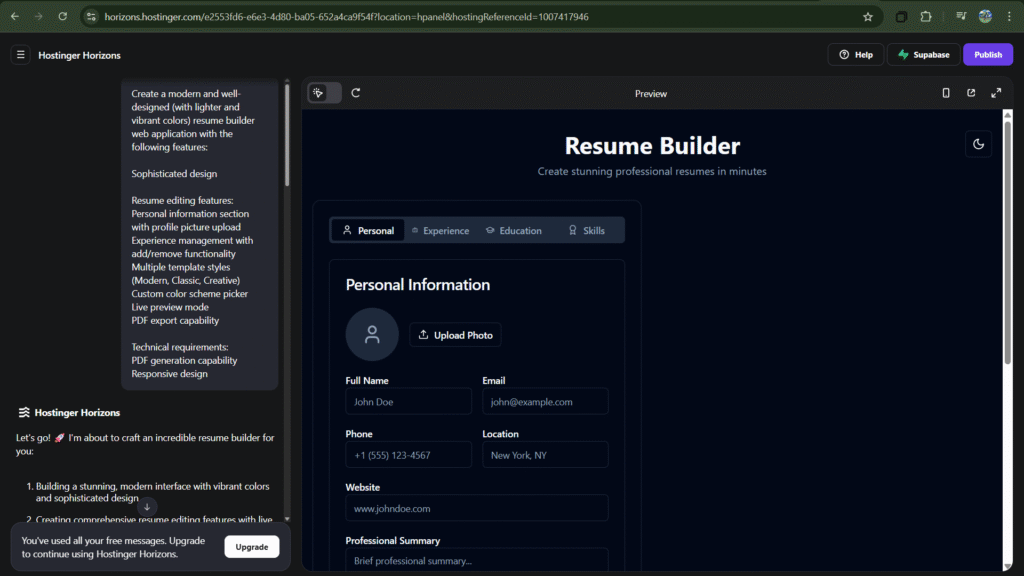
The tool is pretty straightforward: give it a prompt, and it generates a web app for you. I decided to build something useful—a Resume Builder. (I’ll attach a screenshot of the prompt I used for my first try.)
Within a minute, it generated a beautiful and surprisingly functional resume builder app. On the right side, there was a live preview where I could actually interact with the app in real time. I started playing around with it. The first thing I noticed was an error when I clicked on the profile photo icon—but to my surprise, it automatically asked if I wanted to fix it. I clicked Yes, and in the next iteration, the error was gone.
I was pretty excited at this point.
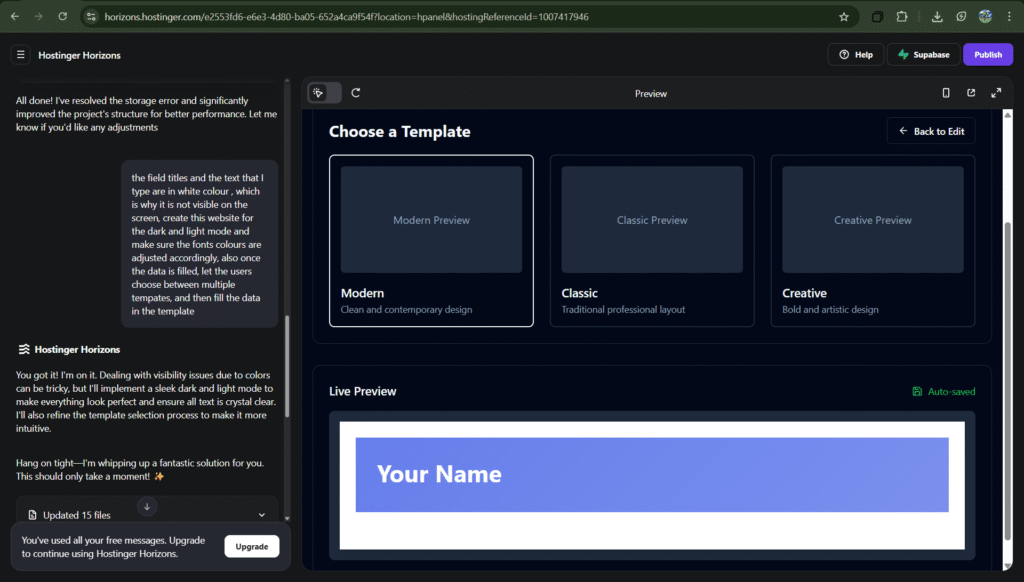
I began suggesting a few more tweaks. For instance, the labels and text fields weren’t visible because their colors matched the background. So, in my next prompt, I asked it to fix that—and it did! Once the basic structure was working smoothly, I got a little more ambitious. I asked it to add dark mode and offer multiple resume templates. Just like before, it generated everything in less than a minute—and it worked beautifully.
By now, I was hooked.
I kept going: I asked it to add options to enable or disable specific sections, reorder the layout, include two more templates, and even support rich text formatting for fields like Work Experience and Education. I also wanted a section to list skills, and so on.
But… I guess I got a little too excited.
Turns out, all of this was a bit too much for the Horizons AI to handle in one go. The preview crashed. It again asked if I wanted to let it fix itself—I said yes—but unfortunately, it couldn’t recover. I tried again, but the same thing happened. And just like that, the 5 free prompts I had were used up, and I was left with a broken app.
Thankfully, there’s an option to revert to the last working version. The catch? You lose all versions created after that point. Still, it let me recover my working app—which is better than starting from scratch.
👍 What I Loved About Hostinger Horizons
- It’s stupidly easy to start : No setup headaches. Just type what you want, hit go, and bam — it gives you a working web app in a minute. I was honestly shocked the first time it worked.
- You can see things live : The live preview on the right? Super handy. You don’t have to imagine how things might look — you see it, click around, and test things instantly.
- It fixes stuff for you : I ran into a small error (like clicking the profile icon), and it asked if I wanted it fixed. I said yes, and it actually did. Felt like having a polite little developer assistant.
- It listens (most of the time) : I gave it small suggestions like “make the text visible” or “add dark mode,” and it just… did them. Smooth, fast, and kind of addictive.
- Revert button = peace of mind : When I broke the app by overloading it with requests, I was able to roll back to the last version that worked. Lifesaver.
👎 What Bugged Me a Bit
- You only get 5 prompts for free : And they go fast. I wasn’t even halfway through my experiments when I hit the limit. So yeah, pace yourself or be ready to upgrade.
- It got overwhelmed when I asked too much : I got carried away and requested dark mode, multiple templates, reorder options, rich text fields — and the poor AI just gave up. The preview crashed.
- Self-fix didn’t really work : When it crashed, it tried to recover. I appreciated the effort, but it didn’t actually fix anything. Felt a bit like a shrug emoji in code form.
- Reverting means losing stuff: Sure, I could go back to the last working version, but I lost everything I added after that. Would’ve been great to have version history or a manual save.
🎯Final Thoughts
All said and done, I had a genuinely fun time with Hostinger Horizons. It’s far from perfect, but if you just want to try out an idea without touching code, it’s a solid playground. I’ll probably revisit it again (with more prompts this time).
Here’s the link to the resume builder I managed to create using Hostinger Horizons:
👉 https://resume-builder.basichumans.com/
I could’ve done more justice to the app if I hadn’t run out of prompts, but overall, it was a pretty cool experience. It’s definitely a fun and useful tool to try.
If you’d like to give Hostinger a spin, feel free to use my referral link:
👉 https://hostinger.in?REFERRALCODE=ZHBTHENILROR
Thanks for reading, folks—see you in the next post!
Leave a Reply